Check out our free, fillable and printable PDF document template planner, organizer, diary and more! It has the features you need to keep your life on track on planner pages that are a fully printable 8.5″ x 11″.
Features at a glance:
- Customize with your own logo or image
- Input your data and save or print
- Print the complete planner or specific pages
- Schedule has easy date pull down for easy calendar reference
- PDF format allows for easy sharing and opening
MAKING YOUR LIFE EASIER
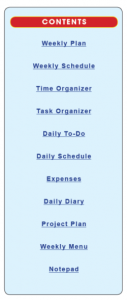 Contents: Weekly Plan, Weekly Schedule, Time Organizer, Task Organizer, Daily To-Do, Daily Schedule, Expenses, Daily Diary, Project Plan, Weekly Menu and a Note Pad.
Click on listings in Contents menu within the planner to jump to desired page.
Instructions For Inputting Your Data:
Date – Place your cursor in the date field, you will be prompted to open up a calendar. It will open with the day’s date. Now choose the dates you want to plan.
Insert your own image – Place cursor on Worldlabel.com logo and click; a Select Image File window will pop up; choose the desired file from your computer. Images must be about 4 inches w x .75 inches. Once you choose a file, it will automatically populate the template.
More Tools: – Fonts: If you want to change the font type, size or color, (as well as bold, italics, etc.) select Control +E if you’re using a PC or Apple + E on a Mac. A toolbar will appear giving you additional text properties. Select “More” in the font properties toolbar for paragraph alignment and more.
- Select Control + 5 to reduce/increase line weights.
- Select Tools > Typewriter > Show Toolbar > fill in the blank areas in the PDFplannerPRO with your desired information.
 Specs:
PDFplannerPRO is cross platform and application independent. It will work on Mac OSX, Linux, Windows, Solaris and other operating systems. There can be compatibility issues between different PDF Readers. For optimum performance and full use of all functions, we recommend you download for free Adobe PDF Reader version 9.
PDF is and ISO International Standard: ISO 32000-1. PDF Reader Required.
~~~
~~~
Continue reading →