Monthly Archives: April 2009

Spreading Digital Freedom with The Whuffie Factor

Tara Hunt’s book, The Whuffie Factor, gives the Free Open Source Software world a tool for thinking about how to reach out beyond the echo chamber of technologists, who already “get” how important FOSS is, to the much larger world of technophobes who, with their whuffie-factordollars and keyboards, will decide whether FOSS will succeed on the desktop or not. We in the FOSS world are really good at writing game-changing code, but we need to get better at getting people to use the code in mainstream applications, and we need to get better at forging alliances.

Tara Hunt’s book, The Whuffie Factor can help us in both of those areas. Her book offers both principled guidelines and clear case examples for forging alliances and creating powerful, grassroots channels for reaching end users. The Whuffie Factor should become part of the discussion as to how we build community among mainstream end users.

Hunt’s premise is that social networking web 2.0 tools are leveling the marketing playing field a bit by offering small and medium-sized businesses (SMBs) such as FOSS projects the opportunity to amplify their reach. That concept is not new, and Hunt didn’t invent it with her book, The Whuffie Factor (TWF). But what is unique to TWF is Hunt’s skill in identifying five core marketing principles and showing us how to implement them. The five core principles are:

  1. Turn the marketing bullhorn around and create continuous conversations with customers (end users). Stop talking and start listening.
  2. Become part of the community you serve. You can’t serve everyone, so don’t try. Identify communities with whom you can connect.
  3. Create amazing customer experiences. Design products and services people love.
  4. Embrace the chaos. Be agile. Respond to change.
  5. Find your higher purpose. Social capital only gains in value as you give it away. Figure out how to give back to the community, and do it often.


Continue reading

Creating an invoicing system with OpenOffice.org

Open Office

If you run a business, finding an efficient system for managing invoices is critical for sustaining a positive cash flow. Here’s how you can create an easy invoicing solution using OpenOffice.org Writer and Calc.

By Dmitri Popov

Continue reading

Clip Art of the Week: Anonymous Clip Arts

One of the solutions to our constant need for developers, is that instead of importing our old collection of clip art algorithmically, on Open Clip Art Library, librarians such as Johnny Automatic, Chovynz, Darth Gimp and others have been helping to clean, manually upload, and tag files for the refreshed Open Clip Art Library.

For this week, I want to feature their work on uploading public domain clip arts from the old system such as these AIGA standard images like this heliport:

heliport

aiga

aiga

If your clip art is uploaded as the anonymous user on Open Clip Art Library, please do contact the Anonymous author to get the clipart added to your account on the new Open Clip Art Library engine. For this week, please do applaud all those who are helping upload old cliparts to the anonymous account to help move us towards our goal of 12,000 clip art uploads this month!

UPDATE: As pointed out, praise Papapishu who has contributed so much to these efforts!

OpenOffice.org Opens up for Business

Open Office logo

The economic situation is eating into your profits, and the Microsoft Office licenses look more expensive than before. Or maybe you are familiar with the way Microsoft Office has looked for over a decade: it had a file menu, edit menu, and format menu, and you balk at the thought of retraining your staff for Microsoft Office 2007’s bizarre ribbon. In either case, you don’t have to buy Microsoft Office thanks to OpenOffice.org: the best kept secret in office suites.

OpenOffice.org is a free office suite that includes a word processor, spreadsheet, slide presentation application, drawing program, and database. It’s compatible with practically all operating systems and runs well on old and new computers alike. Don’t worry about exchanging documents with Microsoft Office users because OpenOffice.org is compatible with many file formats including the new Microsoft Office 2007 formats.
Continue reading

How to create Brayered Labels & Cards by Korin Sutherland

Sweet and Sassy Stamps

Supplies:

  • Stamp set (I used Dream Silhouettes by Sweet ‘n Sassy Stamps)
  • Rubber Brayer (for info about brayers visit this site)
  • Worldlabel (or other brand) mailing labels: any size will do really, but for this particular card I used 1″x 2 5/8″ inkjet mailing labels
  • Kaleidacolor Ink pad by Tsukineko (I used Royal Satin) or other spectrum type pad (a solid color would work too if you don’t have the other kinds)
  • Black Ink (I used Memento Tuxedo Black by Tsukineko)
  • Cardstock: neutral and various colors to coordinate with your ink Embellishments

Continue reading

Clip Art of the Week: Sunflower by Mokush

mokush sunflower

When we released Open Clip Art Library 0.19 last week, the amazing importance of getting back on track with monthly releases cannot be undervalued. As such, we hit a goal of 10,000 pieces of clip art uploaded to our new system. For April we are shooting to get 12,000 total pieces. Right now on April 10, we have 10,540 pieces!

And, for the month of April we challenged the community to upload images related to spring. Mokush hit this one on the head with the lovely sunflower. Please use it freely in your compositions, on labels, on stationary and anywhere you see fit.

Please help us as well grow the project to 12,000 pieces, all which will be included in the upcoming 0.20 Open Clip Art Library packaged release, news written about, and publicized at the upcoming Libre Graphics Meeting in Montreal.

How to Remove Labels from Boxes and Jars

Do you like to recycle boxes and jars? If you do, you probably have been through the “I’ve gotta remove this label” routine at least once. You don’t want others to know your address if you reuse a box for mailing, and you want to use new labels on jars that you reuse for canning or storage. To help you out, we’ve included some tips below that will make this label-removing task a bit easier for you.

Continue reading

Designing a Business Card with WL-OL244 Template

Although I no longer bother to print letterhead or envelopes for my design business (thank you, email!), I’d be lost without a business card. Not only are business cards still traded in the real world, but often it’s the business card itself that helps generate business. Plus, if you’re a graphic designer like me, having a good looking card acts like a mini-portfolio of your skills.

With this in mind, in this tutorial I’ll show how simple it really is to create an effective card that will impress potential clients and help them to remember your name. All this with just a small rectangle of paper. Here goes.

Although business cards often come in many shapes and sizes, for this exercise we’re assuming you want to create a standard U.S. cards measuring 31/2 x 2 inches. Before we get to working with the WL-OL244 template (Download the Template [PDF]), we’ll start by creating one card only. Once we’re happy with the card I’ll show you how to bring it into the eight-up template.

by Scott Citron

Continue reading

Printing Labels in Ubuntu

Like any other modern GNU/Linux distribution, Ubuntu has no shortages of software for printing labels. Many users content themselves with the label and mail merge features in OpenOffice.org Writer or in Abiword or KOffice. All these solutions will do a basic job, especially with text. But what if you want elaborate formatting or graphics with your labels? What if you want a smaller, dedicated program that is quicker to load than a complete word processor? In these cases, you should consider turning to gLabels instead.

gLabels

As you might guess by the name, gLabels is a program designed to run on the GNOME desktop. Specifically, it is designed for GNOME 2.16 or later, which means that it should work on any version of GNOME released in the last four or five years.

By Bruce Byfield

Continue reading

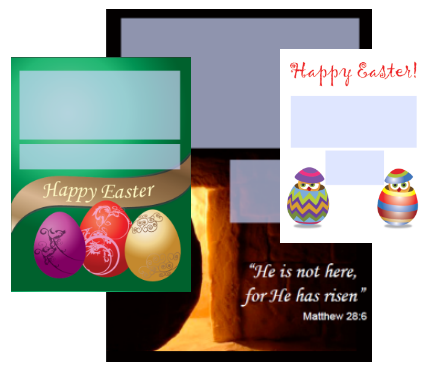
Free Easter Labels and Cards Printable PDF

Easter (Greek: Πάσχα, Pascha) is the most important religious feast in the Christian liturgical year. Some Christians believe that Jesus was resurrected from the dead three days after his crucifixion. Many Christian denominations celebrate this resurrection on Easter Day or Easter Sunday (also Resurrection Day or Resurrection Sunday), two days after Good Friday. The chronology of his death and resurrection is variously estimated between the years 26 and 36 A.D.

Continue reading