You already know how to manage greener business print jobs. But, how can you conserve ink and toner? You probably need that printer for odd jobs, but tools exist that can help you save money and conserve products that can damage the environment. It all begins with the type of printer you use and the ink it requires. But, if you’re stuck on that printer because of budget concerns, let’s go from there…
Continue reading
Monthly Archives: February 2009
Free PhotoShop OpenSource Alternative: GIMP and its Derivatives
Web designers, photographers and graphic designers loving the Adobe Photoshop Product family – a collection of graphics editing programs developed by Adobe Systems to create and edit images – should have a look at its open source alternative, GIMP.
GIMP – GNU Image Manipulation Program – is the most well-known open source graphics editing application, born in 1995 as reported in the GNU free software directory, is a freely distributed program for tasks like photo retouching, image composition and authoring. Last but not least the so-called batch mode that allows you to do image processing from the command line.
GIMP is not only an expert quality photo retouching program, it is also a simple drawing program and an image format converter (it’s worth mentioning that it manages psd, Photoshop’s file format as well as scalable vector graphics (svg) file format).
GIMP is extensible, its functionalities can be augmented with plug-ins and there are extensions that allow you to configure GIMP to replace Photoshop to do just about anything.
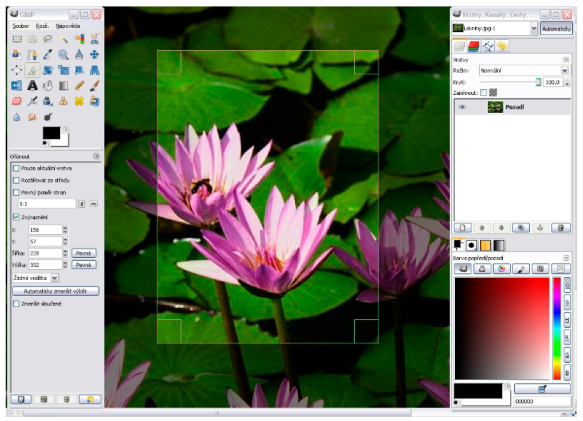
If you really want a GIMP version as close as possible to Photoshop, I recommend that you also take a look at GimPhoto, a GIMP modification with a different menu layout, selection of plugins, and additional resources. GIMPhoto, used in combination with GimPad, formerly known as GimPhoto Desktop, gives its best, and you don’t need to spend time searching all over the internet to find plug-ins to extend GIMP capabilities.
GIMPshop also use GIMP as the backend, adding an extra interface to make its look&feel more like Photoshop. GIMPshop addresses some common criticisms regarding GIMP’s interface, modifying the menu structure to adjust the program’s terminology to match Photoshop.
GIMP comes with documentation for both users and programmers, including tutorials.
By Roberto Galoppini of Commercial Open Source Software

How to Manage Greener Business Print Jobs
Most businesses, including newspapers, don’t produce the printed matter that they consume. The supply chain that a business uses to order print supplies needs to be scrutinized to realize the potential for change.
Although environmental standards for “green printing” don’t exist, you can learn more about how to reduce waste around your office. You can begin by using our Green Labels, which are made from 100 percent post-consumer waste. Then, the following list will help businesses understand the questions to ask to find a printer who uses green printing processes. Additionally a few ideas have been peppered throughout this list to illustrate how a business can handle its printed matter in an environmentally friendly way.
Our AutofillPDF-Labels 1.0 on the Web
Print Your Labels and Business Cards In An Instant, Easy, Simple and Quick.
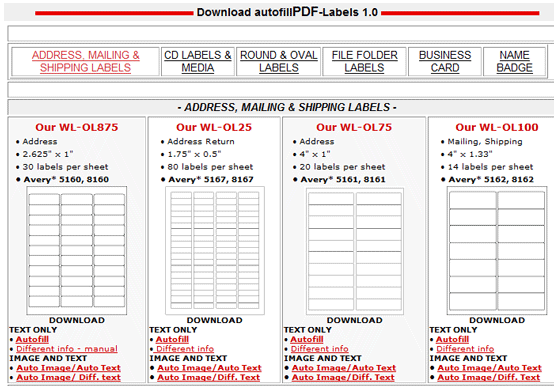
AutofillPDF Labels is a handy web tool for anyone who’s wanted to print their own labels of any kind, but loathes the idea of manually filling out the printing template over and over.
Many print-your-own label packets come with links or CDs that provide you with a pre-formatted Word document to fill out. Unless you’re getting married or sending out other invitations, though, you’ll usually end up putting the same thing on each label, and Ctrl-C/V-ing your precious time away.
This handy webapp pops open a scripted PDF file on any system, while letting you change the font, styling, size, and other text properties, and also add images in short shrift. In other words, you create one label, and the PDF fills out the rest of them for you. The templates include CD labels, address or mailing, file folder labels, and even non-sticky business cards. Free to use, no sign-up required, and it works best with Adobe Acrobat (the free reader).
Via Lifehacker.com
via Makeuseof.com
Two Excellent Photoshop Label Tutorials

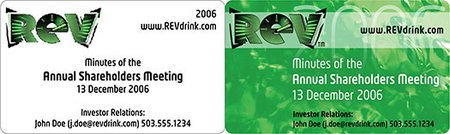
If you use Photoshop, then you have a tool on hand that you can use to design labels. And, you don’t need to re-invent the wheel, because you have access to two great Photoshop tutorials at hand. The first tutorial, written by Pariah S. Burke, shows how to build and re-use a label template for items such as the business cards shown above.
Using Photoshop and Worldlabel Label Templates, Burke – a noted author, graphic designer and Photoshop guru – shows users how to create a template in Photoshop step-by-step. The result is a PDF that you can reuse over and over. And, if you’re not as comfortable with Photoshop as you are with Illustrator or even InDesign, Burke shows how the same PDF label templates from WorldLabel.com work equally well in those applications with a remarkably similar procedure. Read the complete tutorial at Photoshopsupport.com
Important Tips For Starting Your Own Small Brewery
When I think of starting a small brewery, my back starts to ache. I imagine my shirt pockets stuffed with receipts and invoices and I get a sharp panicky feeling about when I would ever have to time to do all the things I need to accomplish. Before getting to that point, there are preparations that anyone thinking of starting a craft brewery should consider to make sure they are truly ready to take on the business of a craft brewer:

PDFcalendarPRO: Free Fillable Calendar, 2009 Printable PDF template
Check out our free, fillable and printable PDF document template 2009 calendar with notepad! It has the features you need to keep your life on track on calender pages that are a fully printable 8.5″ x 11″. Please also check out our PDFplannerPRO, a fillable printable planner, organizer, diary and more!
Click here for the 2010 calendar fillable PDF
Features at a glance:
- Customize with your own logo or image
- Input your data and save or print
- Print the complete calendar or specific pages
- Notepad for each month
- PDF format allows for easy sharing and opening
Clip Art of the Week: Abe Lincoln + Obama
This is a new weekly blog post which highlights great quality clip art found at Open Clip Art Library. It will be blogged here at the Worldlabel blog and point out great clip art and provide a rallying cry to make better clip art in order to be featured each week. If you make clip art in response to the weekly clip art, don’t be shy! Please comment on this blog linking to your clip art.
This week, artist Shepherd Fairey has taken much heat over his OBAMA Hope poster which has been claimed to use an unauthorized photo by an Associated Press photographer. This image is the definitive image of OBAMA that most have seen and will be remembered through the ages as linked to OBAMA winning the presidential campaign of 2008.
Regardless of the outcome of this lawsuit against Mr. Fairey which appears to be shielded by Fair Use in the US, nothing should stop us from highlighting a great woodcut of President Lincoln done by Johnny Automatic from an old public domain source, available at the Open Clip Art Library:
Please use this image anywhere you want! Clip art submitted to the Open Clip Art Library is released into the public domain meaning, you can do anything you want with it!
While I would have linked to a great example of OBAMA for this first clip art of the week at worldlabel.com, I want to issue a challenge to all to create a nice legal image clip art of OBAMA similar to this one by rg1024:
Please take the invitation, create your own OBAMA clip art, upload it to Open Clip Art Library, and comment on this blog post with your creation! People will use your clip art and spread the greatness of your creations.
Quick Free Business Cards Online
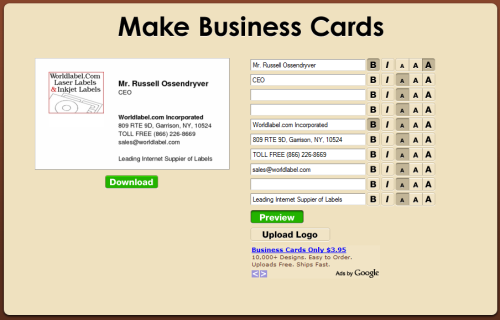
You can quickly and very easily generate your own business cards online for free at freepdfcards.com:

Use Worldlabel’s standard business card stock to print
Another quick and easy way to create business cards is using AutofillPDF-labels. Here all you have to do is select an image which will automatically populate the template, and then type in your information > press tab to finish populating the format.
Fonts: If you want to change the font type, size or color, (as well as bold, italics, etc.) in the AutofillPDF-labels, select Control +E if you’re using a PC or Apple + E on a Mac. A toolbar will appear that will provide you with additional text properties. Select “More” in the font properties toolbar for paragraph alignment and more changes as desired.
How to Use Mail Merge with AbiWord and KOffice
If you have read Solveig Haugland’s “Mail Merge in Openoffice.org: Everything You Need to Know,” then you already know how to use mail merge to reduce your workload in one free and open source software application (FOSS). However, OpenOffice.org is not the only FOSS application you can use for mail merge. You can also use AbiWord or KWord to get the same advantages.
Both AbiWord and KOffice were originally built for GNU/Linux, but both now have versions for Mac OS X and Windows as well. AbiWord is a standalone word processor, while KWord is part of KOffice, which started as an office suite for KDE, one of the most popular interfaces for GNU/Linux. Although neither AbiWord nor KWord has as many features of OpenOffice.org, both are developed enough for many users’ needs. Some people prefer them because they are smaller and faster than OpenOffice.org, and therefore run better on older and slower computers.